
The following steps outline setting up stand downs with Klaviyo, however most ESPs should have similar functionality. Please consult your ESP representative if you're having trouble.
In simple terms, you'll create a "webhook" step in your marketing automation that sends the email of the user you want Checkmate to stand-down to Checkmate servers.
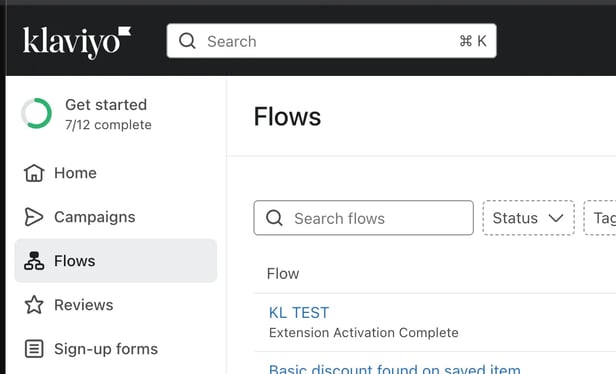
First, navigate to the Flow Editor by clicking “Flows” in the Klaviyo sidebar and selecting the name of the flow you want to exclude users from.
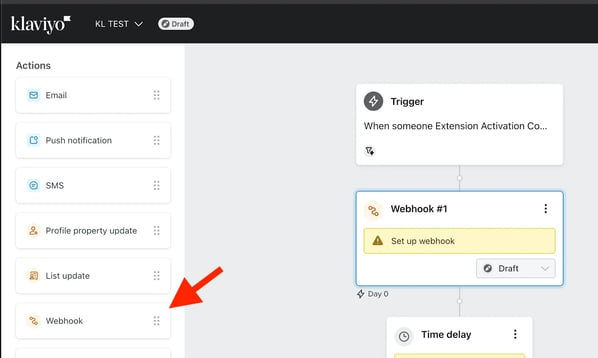
Add a “Webhook” block at the point in the flow where you want to issue the stand down (typically near the start of the flow).
Go to the "Webhook Details" section, set the following fields:
WEBHOOK NAME: Checkmate Stand Down
DESTINATION URL:
https://joincheckmate.com/api/webhook/stand-down?accountId=[storename].myshopify.com
DATA: The "{ { person.email } }" is a function provided by your ESP to insert the user's email. It may be different, so be sure to check your appropriate documentation.
{
  "email": "{ { person.email } }"
  "standDownDuration": "24hr"
}
FULL EXAMPLE:
Webhook Method: POST
URL: https://joincheckmate.com/api/webhook/stand-down?accountId=test-store.myshopify.com
Data:
{
  "email": "{ { person.email } }"
  "standDownDuration": "72hr"
}
Recommended durations:
- Welcome Flow
- 72 hour stand down for people added to CRM via website
- Cart Abandonment
- 24hr stand down for emails sent
- Checkout Abandonment
- 24hr stand down for emails sent
- Browse Abandonment
- 24hr stand down for emails sent